itstargetnews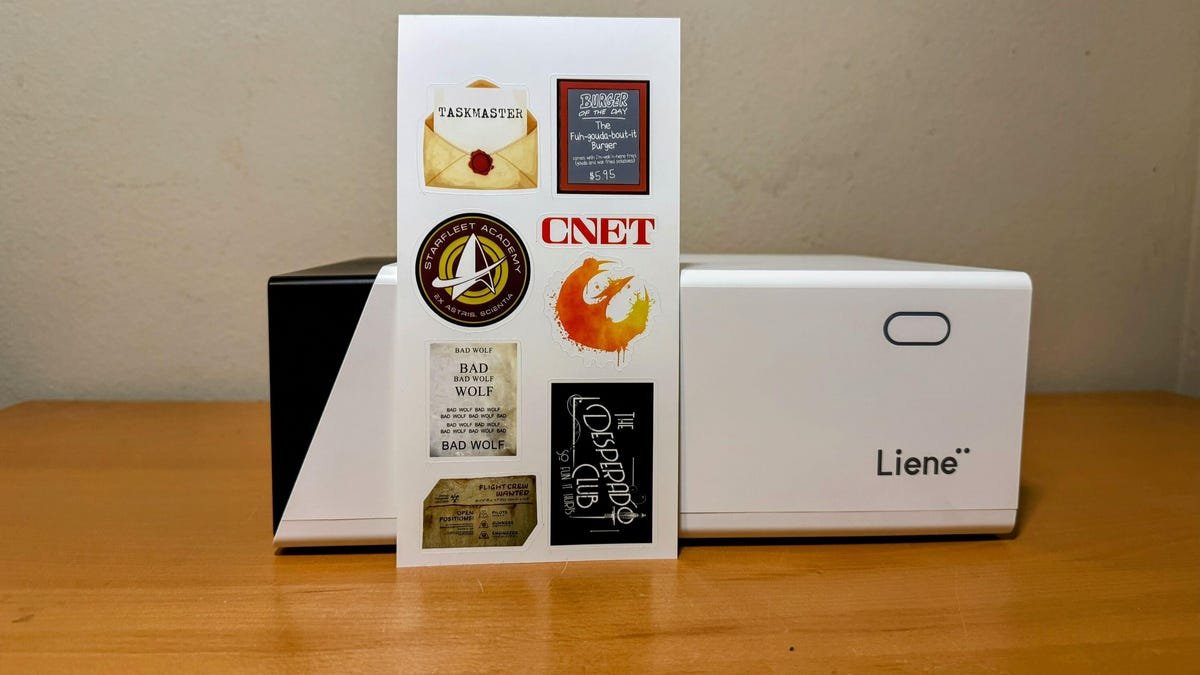
If you want a good sticker, what you see in front of you is an instant gratification machine for creative types. A sub-$300, super portable, full color sticker machine that cuts the sticker as it prints. You can go from idea to sticker on the back of your laptop in a few minutes, and you can do it from anywhere that has an outlet to power this machine.
I have spent the last two weeks taking this printer with me to family gatherings, parties with friends and even to a coffee shop down the street from my house. Everyone I showed this printer to loved it and wanted a sticker from it right away. But when it comes to owning one of their own, I find a surprising amount of hesitation and questions.
This super portable sticker printer can take you from idea to physical sticker in minutes, which is more fun than you think.
Liene’s PixiCut S1 does what it says on the box. You load the ink cartridge into the machine, pop the sticker sheet on the cartridge, and everything happens on your phone. The resulting stickers are reasonably water-resistant, stand up better than most in high sunlight and are almost as scratch-resistant as you’d buy from a high-quality artist.
I’ve printed stickers with this machine that has survived several runs through a dishwasher and an entire week sitting in the California sun, with no obvious signs of wear. These stickers hold up better than anything I’ve ever done on a Cricutand printing it took very little effort on my part.
After the printing process, the sticker sheet is individually cut using a Cricut-like tool built into the machine.
The big magic here is the built-in cutting tool. Like a Cricut, this one blade knows exactly how hard to push to cleanly cut the paper and uses the same path outlined in the shared artwork. The paper never leaves the printer, so the cutting part of the machine doesn’t need a complicated calibration step to get the job done.
When the color print is finished, the paper is pulled back into the machine and the blade turns on. And since this machine is only 11 inches tall, you can throw it in a backpack and take it anywhere. The same is true of the Cricut Joy and the slightly larger Joy Xtra, but the Cricut’s sticker quality is lower and the printing and cutting process is worse.
Liene’s software is reasonably intuitive and has many options to explore. If you’re designing your own art and just want to get it in sticker form, you can easily upload and tweak the settings for the type of cut you want. Whether you want a consistent white border or a full color bleed, the settings for this are about as straightforward as they get.
Liene’s app lets you organize everything on the sheet so you know exactly what you’re getting.
If you want a quick label for something, the in-app editor has a lot of options to make it look nice. If you lack artistic skills, there’s a built-in AI tool that will create something handy more often than not. Aligning multiple images, or clones of the same image, is easy to do in seconds. You can use this software on a bigger screen if that’s what you want, but I can’t say I need anything other than my phone to make something beautiful.
As much as I enjoy this machine, I don’t think I would go so far as to call it a sticker printer for professionals. The PixiCut S1 prints at a sufficient resolution with a color palette strong enough for many smart uses, but in my review I found a consistency issue that can easily annoy artists trying to bring their work to physical form.
Cutting the same sticker 10 times does not yield 10 identical stickers. The position of the paper, the size of the sticker and the level of detail you want to cut around can affect the quality of the cut in ways that are difficult to predict. Sometimes the sticker comes out perfect, other times I find a small white area where it shouldn’t be. It’s not a deal-breaker for making the occasional fun sticker, but that kind of consistency is important to an artist.
The lines these stickers cut can be cleaned up a bit with some careful editing in the app, but the default settings make a lot of small mistakes.
A possible deal-breaker for the occasional home crafter using this machine is the printing process. While thermal dye sublimation as a printing method is not considered particularly toxic, the PixiCut S1 will produce some noticeable smoke during a full page print. It will be a moment in the eyes if you are close. It’s not a big deal in a large or reasonably ventilated room, but it’s noticeable when you’ve got it sitting at the kitchen table with kids waiting for their latest dopamine hit in sticker form.
And speaking of kids using it, Liene’s software is not good at accurate error reporting. It can also be difficult to troubleshoot why a paper is jamming or how to determine how much ink is left. The support documentation for this printer is inadequate. I didn’t run into many errors, but when I did it took more time than it should have to properly diagnose and fix.
As I sit down to write this, I find myself struggling to identify clearly who this printer is for. Small home crafters I showed this printer to see the value of higher quality stickers than they can with their Cricut, but the price puts this model outside the territory of purchase and something they plan to buy if the budget allows.
Crafty people who sell at local events will definitely enjoy making one or personal stickers with this printer, but most people I’ve talked to have more options and better quality control by working with companies like Sticker Junkie. Each sheet of 4×6 stickers retails for about $1.75, which is good enough for a single sticker but a bit pricey for making anything in quantity.
Finally, this printer is great for people in between. If you want higher quality, custom stickers in minutes from a printer you can easily get most places, this one has your name all over it. Sometimes you get frustrated if a print isn’t perfect, and you can abandon this method of printing if your art becomes a small business. But every time a print goes off and you peel off something you’ve designed, everyone nearby smiles. I know I’m sure.